☑️ 객체의 종류
- 내장객체 : 자바스크립트 엔진에 내장되어 있음. 내장객체로는 문자(String), 날짜(Date), 수학(Math), 배열(Array)등이 있다.
- 브라우저 객체모델(BOM, Browser Object Model) : 브라우저 계층 구조로 내장되어있는 객체로 window, screen, location, history, navigator 객체등이 있음.
- 문서 객체 모델(DOM, Document Object Model) : HTML문서 구조를 말함. 최상위 객체로는 HTML이 있으며 그 하위 객체로는 head와 body가 있다.
☑️ 내장객체
참조변수(인스턴스 이름) = new 생성함수()
예제1)


날짜 정보 객체 : 날짜나 시간 관련 정보를 받고 싶을 때는 날짜 객체를 생성
참조변수 = new Date(); //ex)var t = new Date();
특정 날짜의 정보객체 생성방법
참조 변수 = new Date("연/월/일"); //ex) var t = new Date("2002/5/31");
참조 변수 = new Date("연, 월-1, 일"); //ex) var t = new Date(2002,4,31);
예제2)
<!DOCTYPE html>
<html lang="en">

<head>
    <meta charset="UTF-8">
    <meta http-equiv="X-UA-Compatible" content="IE=edge">
    <meta name="viewport" content="width=device-width, initial-scale=1.0">
    <title>Document</title>
</head>

<body>
    <script>
        var today = new Date();
        var nowMonth = today.getMonth(),
            nowDate = today.getDate(),
            nowDay = today.getDay(); //오늘 날짜 정보 객체 생성

        document.write("<h1>오늘 날짜 정보</h1>");
        document.write("현재 월:" + nowMonth, "<br>"); //현재 달 정보를 가져옴
        document.write("현재 일:" + nowDate, "<br>"); //현재 일 정보를 가져옴
        document.write("현재 요일:" + nowDay, "<br>"); //현재 요일 정보를 가져옴

        var worldcup = new Date(2002, 4, 31);
        var theMonth = worldcup.getMonth(),
            theDate = worldcup.getDate(),
            theDay = worldcup.getDay();
        document.write("<h1>월드컵 날짜 정보</h1>");
        document.write("2002월드컵 몇월:" + theMonth, "<br>");
        document.write("2002월드컵 몇일:" + theDate, "<br>");
        document.write("2002월드컵 무슨 요일:" + theDay, "<br>");

    </script>
</body>

</html>
현재 날짜부터 특정 날짜까지 며칠이 남았는지 구하는 형식 (남은 일수는 밀리초 (1/1000초) 단위로 계산)
남은 일 수(밀리초) = 특정 날짜 객체 - 현재 날짜 객체 1초 = 1000(msc) 1분(60초) = 1,000 * 60
//60,000(msc) 1시간(60분) = 1,000 * 60 * 60
//3,600,000(msc) 1일(60분 * 24) = 1,000 * 60 * 60 * 24
//86,400,000(msc)
예제3) 현재 날짜부터 연말까지 며칠이 남았는지 날짜 정보 객체를 이용하여 알아보기
 var today = new Date();
 var nowYear = today.getFullYear();
 var theDate = new Date(nowYear, 11,31);
 //올해 연말에 대한 날짜 정보 객체를 생성
 var diffDate = theDate.getTime() - today.getTime();
 //남은 날 = 특정 날짜 - 현재 날짜(밀리 초 단위)
 var result = Math.ceil(diffDate / (60 * 1000 * 60 * 24));
 //Math.ceil() 메서드를 사용하여 반올림
 document.write("연말 D-day:" + result + "일 남았습니다. ");
수학객체 : 사칙연산은 산술 연산자를 사용하면 되지만, 최댓값, 최솟값, 반올림 값 등은 산술 연산자로 구할 수 없기 때문에 수학 객체를 활용하여 값을 구함.

예제4)
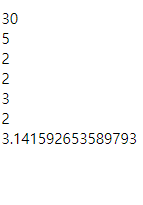
 var num = 2.1234;

 var maxNum = Math.max(10, 5, 8, 30), //최댓값 30
 minNum = Math.min(10, 5, 8, 30), //최솟값 5
 roundNum = Math.round(num), //소수점 첫째 자리 반올림 2
 floorNum = Math.floor(num), //소수점 첫째 자리 내림 2
 ceilNum = Math.ceil(num), //소수점 첫째 자리 올림 3
 randomNum = Math.random(), //0과 1사이의 난수 발생 0~1
 piNum = Math.PI; //원주율 상수를 반환 .14

 document.write(maxNum,"<br>");
 document.write(minNum,"<br>");
 document.write(roundNum,"<br>");
 document.write(floorNum,"<br>");
 document.write(ceilNum,"<br>");
 document.write(roundNum,"<br>");
 document.write(piNum);
결과값
//이때, 0과 1사이가 아닌 임의로 지정한 숫자 구간에서 난수를 정수로만 반환 받으려면?
Math.random()*10

//0부터 10까지 실수로 난수를 반환
Math.floor(Math.random()*11);

//0부터 10까지 난수를 발생하여 소수점 값을 제거
//120~150 사이의 난수를 정수로만 발생시키기
Math.floor(Math.random()*31);
//0부터 30까지 정수로 난수를 발생
Math.floor(Math.randaom()*31)+120;
//120부터 150까지 정수로 난수를 발생
//난수를 발생하여 자신이 원하는 구간 사이에서 정수가 발생하게 하려면?
Math.floor(Math.random()*최댓값-최솟값+1)+최솟값;
반응형
'퍼블리싱 > Javascript' 카테고리의 다른 글
| [javascript] 객체03 (문자열 객체) (0) | 2021.07.28 |
|---|---|
| [javascript] 객체02 (배열 객체) (0) | 2021.07.26 |
| [javascript] 반복문 (0) | 2021.07.25 |
| [javascript] 선택문 (0) | 2021.07.25 |
| [javascript] 조건문 (0) | 2021.07.24 |